Need a new custom design? I am available to help you.

Dose Text Effect PSD

Friends, today's design resource is a beautiful 3D text effect called Dose. This effect is created using smart-object layers and can easily be edited and replaced with your own text. You can use the text effect to make your normal text look interesting with depths and eye-catching elements. You can easily change the color of the text and background.
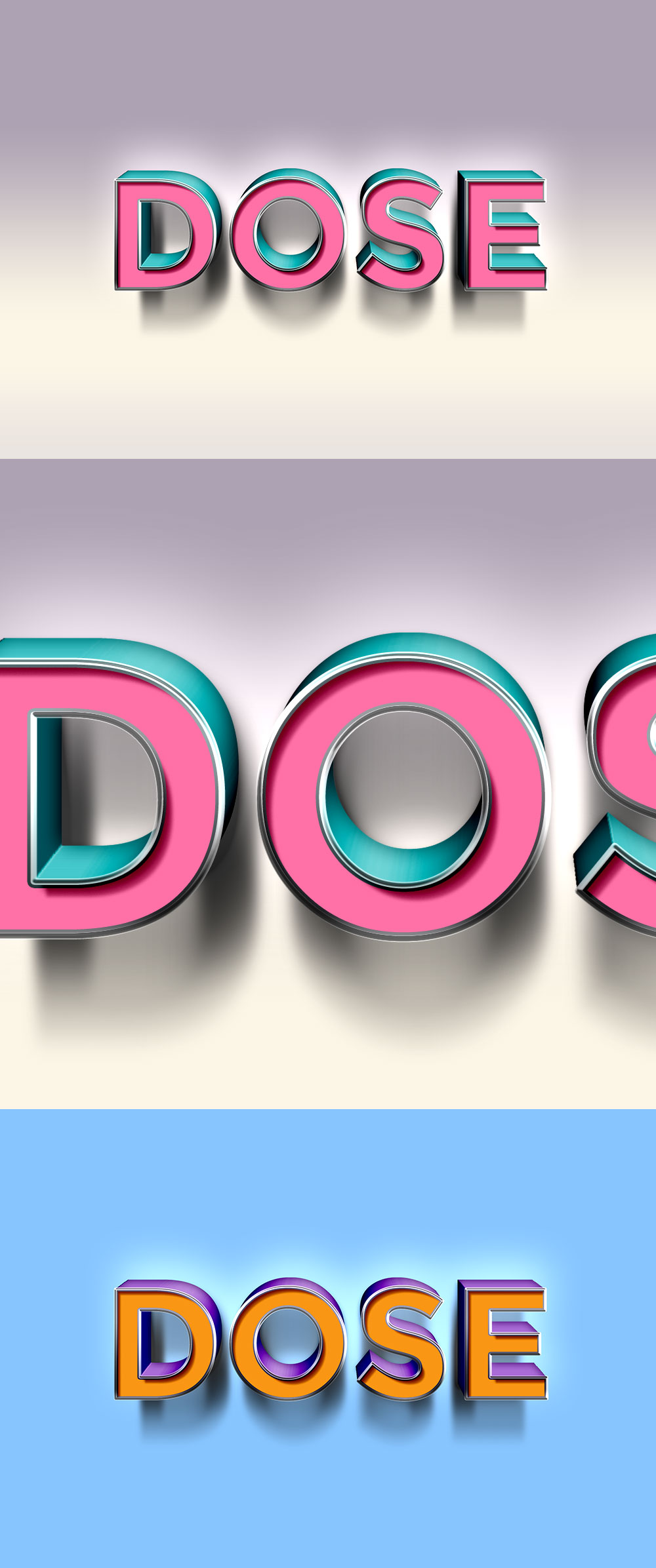
3D Text Effect PSD

File Format: .PSD
Layers: Smart-Objects
Dimensions: 3000x2000 pixels
File Size: 4.75 MB
Subscribe & get a FREE Bundle of 30 design files to your email

I accept the privacy policy and would love to receive emails

Quick Categories

Ready to unlock our full premium library with commercial license?

dorsal spine icon. Linear, Blue Fill and Gradient Style Design Isolated On White Background
EDITABLE LOGO TEXT EFFECT EPS FILE
3D TEXT EFFECT PROMO VECTOR EDITABLE
Price editable text effect, lettering typography font style, luxury 3d text for tittle
Logo Editable Text Effect Design
Close shop typography word art illustration, poster, editable text effect, file EPS
Dot Text for Title or Headline. In 3D Fancy Fun and Futuristic style
Close shop typography word art illustration, poster, editable text effect, file EPS
EDITABLE PLAY QUEST TEXT EFFECT EPS FILE
Effect 3d editable text style effect
Discount text effect editable modern lettering typography font style, trendy 3d text for tittle and sticker
3d text effect 12.12 sale poster banner vector
Clean editable text effect in 3d style. Text emblem for advertising, branding, business logo
decorative editable rose text effect vector design
Special discount 3d editable text effect
EDITABLE PAINT TEXT EFFECT EPS FILE
3D Pop Art Text effect editable vector
Premium 3D Text Effects. easy to use and edit

6 thoughts on “Dose Text Effect PSD”

  1. see this is bullshit how do you know what to do were are the instructions for this!!!!!!!!!!!!!!!!!!!!!!!!!!!!!!!!!!!!!!!

    1. Rafiullah Mohammed

      You can use the smart-object layers within the PSD file to add your own designs. Once you open the PSD file in Photoshop, double-click the smart object layer and it opens a new doc. There add your text and save. Hope this helps. Thank you!

Leave a Comment

Your email address will not be published. Required fields are marked *